
SAMPANN pension portal developed by Office Of Controller General of Communication Accounts, integrates with UMANG Portal
SAMPANN Integration on UMANG Enables Easy PPO & Life Certificate validity status for about 4 lakh pensioners of Department of Telecommunication across the country
The SAMPANN pension management system developed by the office of Controller General of Communication Accounts has been integrated with the UMANG (Unified Mobile Application for New-age Governance) platform. This initiative facilitates pensioners in retrieving their Pension Payment Order (PPO) number and Life Certificate (LC) validity status via the UMANG web portal or mobile application, thereby ensuring that all the pensioners have access to vital information related to their pension available at all times.
Shri Ashish Joshi, Principal Controller of Communication Accounts (Pr. CCA), Delhi, emphasized that this integration is designed to enhance ease of access for pensioners, promote transparency, and ensure the seamless delivery of pension-related information via a unified digital platform. The availability of these services through the UMANG application, complemented by the recent DigiLocker integration, underscores the department’s commitment to providing prompt and transparent services to all pensioners.
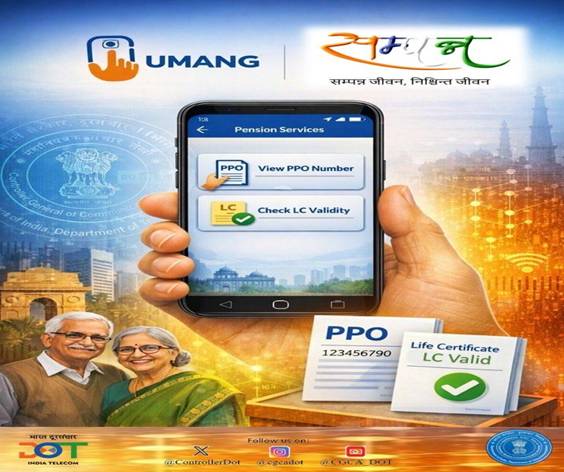
UMANG constitutes a singular unified platform—encompassing a mobile application and web portal—for accessing government services proffered by Central, State, and Local bodies, anytime and anywhere. As part of the Digital India initiative, it is available on Android, iOS, and web platforms. Pensioners are advised to access the UMANG application from the Google Play Store, Apple App Store, or https://web.umang.gov.in/, authenticating via Aadhaar.
About SAMPANN: SAMPANN (System for Accounting and Management of Pension) is a flagship digital platform of the Department, developed, owned, and operated by the Office of the Controller General of Communication Accounts for pension administration and allied financial management functions. Dedicated to the nation by the Hon’ble Prime Minister on 29th December 2018, it marks a shift from system-centric administration to pensioner-centric governance, freeing retirees and their families from visiting offices to claim their rightful benefits.
SAMPANN has digitized the entire pension lifecycle—from initiation and processing of cases to issuance of e-Pension Payment Orders, disbursement, accounting, reconciliation, financial reporting, audit facilitation, and grievance redressal. Pensioners now receive payments directly into their bank accounts, eliminating the need to visit banks or government offices; they can check payment status, submit life certificates, generate e-PPOs, request changes like mobile numbers or addresses, and register complaints from home. The Department also operates toll-free helplines to further assist our esteemed senior citizens.
FAQ- UMANG for accessing SAMPANN Services
1. What is UMANG?
UMANG is a single unified platform (mobile app + web portal) to access government services offered by Central, State, and Local bodies—anytime, anywhere. It’s part of the Digital India initiative and available on Android, iOS, and the web.
2. How to Access UMANG?
a. Via Web Portal
1. Go to the official portal: https://web.umang.gov.in/
2. Click Login/Register at the top.
b. Via Mobile App
1. Download the UMANG app from the Google Play Store (Android) or App Store (iOS).
2. Open the app and choose a language of your choice.
3. Allow required permissions (for a better user experience).
3. How to Register & Log In?
Register
1. Open the app/portal and tap Login/Register.
2. Click on Signup for Registration.
3. Enter your mobile number and click on Generate OTP.
4. You’ll receive an OTP (One-Time Password)—enter it to verify your number.
Set MPIN
1. After verifying OTP, you will be prompted to enter requisite details and create an MPIN (mobile PIN)—this secures your login.
2. Save your MPIN for future logins.
Log In
• You can log in using:
✔ MPIN
✔ OTP sent to your registered mobile
✔ The DigiLocker account details can also be used to log in directly on UMANG.
4. How to explore services on UMANG?
Find & Use Services
1. After login, the user will see the UMANG dashboard.
2. Users can use the search bar or browse categories to find services.
3. SAMPANN service can be explored on UMANG portal with keywords viz. Telecommunications, SAMPANN, Pension, PPO, CGCA, Life certificate, etc.
4. SAMPANN services can also be searched under the category “Social Security & Pensioner” on UMANG Portal.
5. How to use SAMPANN Services on UMANG?
Presently, two services of SAMPANN are hosted on UMANG:
a) Know your PPO number:
SAMPANN users can enter their bank/post office account number & date of birth and click on Submit. The system will display the PPO number associated with the entered
details.
b) Life certificate validity date:
SAMPANN user can enter their Bank/Post office Account number/SAMPANN registered mobile number/PPO number and Date of Birth and click on Submit. The Life Certificate validity date will be displayed on the screen.
****
MI/ARJ
(Release ID: 2216904) Visitor Counter : 177


0 Comments